"Don't use more than three H2 headers or Google will penalize you."
The Myth
Is there a limit to how many H2 tags you can use?
If you’ve spent more than five minutes researching SEO, you’ve likely run into this “rule.” It sounds official, it sounds technical, and it’s completely wrong.
In the early days of the web, SEO was a game of rigid formulas and hidden tricks. But as Google’s algorithms have evolved into sophisticated AI systems, they’ve stopped looking for “perfect” tag counts and started looking for one thing: a great user experience. The truth is, your H2 headers aren’t a scoreboard; they are a roadmap. Limiting your H2s to satisfy a non-existent rule is like a book publisher deciding a novel can only have three chapters regardless of how long the story is. It doesn’t help the reader, and it certainly doesn’t help Google understand your content.
In this guide, we’re going to debunk the “multiple H2” myth once and for all, look at what Google’s own expert has to say about heading hierarchy, and show you how to structure your posts for maximum visibility — without the unnecessary stress.
The Power of "Multiple H2s"
H2 headers are used to break your article into its main sections. Using multiple H2s helps in two ways:
For the Reader
For the Reader: It makes the text "scannable." Most people skim a blog post before deciding to read it.
For the AI/Search Engine
For the AI/Search Engine: It acts as an outline. If you have a H2 that says "Why are my night photos turning out red?," search engines can match this to the same query and knows exactly which part of your article answers that specific question, thus it will more likely serve this in its result.
Where Did This "Rule" Come From?
To understand why the myth exists, it helps to understand where it came from.
In the early 2000s, heading tags genuinely did carry significant ranking weight. Back then, Google’s algorithm was relatively blunt. If you stuffed keywords into an H1, an H2, and every heading below it, you got a meaningful ranking bump. SEO advice from that era hardened into gospel, and people started constructing rigid formulas: one H1, a handful of H2s, a couple of H3s — and don’t you dare go over.
The problem is that Google’s algorithm has changed completely. Natural language processing, AI, and semantic understanding now allow Google to comprehend a page the same way a thoughtful human reader would. The old keyword-counting tricks don’t move the needle the way they once did, yet the rigid heading “rules” stuck around — repeated in blog posts, sold in SEO courses, and flagged endlessly by automated audit tools.
Automated audit tools deserve special mention here. Many popular SEO platforms will flag “multiple H1 & H2 tags” or an “excessive” number of headings as errors, displayed in alarming red. These flags exist because the tools are running pattern-matching checks based on outdated 2005-era logic, not because Google has ever said these things are harmful. Seeing a red flag in an audit dashboard feels authoritative, and so the myth perpetuates itself.
What Google Actually Says: Straight From John Mueller
Google’s systems don’t mind if a page has one H1 or five H1s (though one is still "best practice"). If the algorithm doesn't care about H1s, it certainly won't penalize you for having 10 H2s.
Google’s John Mueller
The clearest and most authoritative rebuttal to the heading-count myth comes directly from Google itself.
John Mueller, Google’s Search Advocate and one of the company’s most prominent public voices on SEO, has addressed heading tags explicitly and repeatedly.
In a Google Search Central #AskGoogleWebmasters video, Mueller stated:
“Our systems don’t have a problem when it comes to multiple H1 headings on a page. That’s a fairly common pattern on the web.”
He went further, clarifying how Google actually processes headings:
“We use headings to better understand the context of different parts of a page. Having clear, semantically understandable headings is useful in understanding any given page; however, we have to work with the web as we find it, and a lot of it isn’t semantically structured at all. For users, the difference is minimal — both kinds of pages can be extremely relevant to a question that they have. In turn, our systems aren’t too picky and we’ll try to work with the HTML as we find it, be it one H1 heading, multiple H1 headings, or just styled pieces of text without semantic HTML at all.”
And in a separate Google office hours hangout, Mueller was even more direct when asked how many H1 tags a page should use:
“You can use H1 tags as often as you want on a page. There’s no limit, neither upper or lower bound. Your site is going to rank perfectly fine with no H1 tags or with five H1 tags.”
Now, while Mueller’s comments centre on H1 tags specifically, the principle extends logically to H2s and the rest of the heading hierarchy. If Google’s systems aren’t penalising pages for having multiple H1 tags — which carry more semantic weight than H2s — there is certainly no penalty for using as many H2 headings as your content legitimately requires.
Mueller’s closing advice on the subject is perhaps the most important thing any WordPress blogger can take from this discussion:
“In short, when thinking about this topic, SEO shouldn’t be your primary objective. Instead, think about your users.”
Hear it from the man himself
If Google doesn’t even penalise a page for having multiple H1s (the “most important” tag), they certainly aren’t counting your H2s.
- Context over Counting: John Mueller explains that Google uses headings to “better understand the context of different parts of a page.” They are looking for a roadmap, not a specific number of signs.
- HTML5 Standards: Modern web design (HTML5) actually expects multiple H1s and H2s, because pages are built in distinct “sections” — a sidebar, a main article, a footer — each with its own content and context. Rather than seeing multiple headings as clutter, Google’s systems use them to identify where one topic ends and another begins, matching specific sections of your page to specific search queries.
- The “SEO Audit” Trap: Most SEO tools (like Diib, Semrush, or Ahrefs) flag multiple H1s/H2s as an “Error.” Many of these tools are using outdated 2005-era logic. Google’s modern AI is much smarter than a simple checklist. I get clients come to me all the time citing these tools and saying how they keep getting these error warnings! Don’t get me wrong — these are great tools and I use them myself. Just treat the flags and warnings with judgment rather than feeling you have to act on every one.
"Best Practice" vs. "The Law": An Important Distinction
It’s worth being precise here, because nuance matters.
Mueller and Google do have a stylistic preference: one H1 per page is still considered best practice. This isn’t because Google penalises pages with multiple H1s, but because a single H1 communicates a clear, unified topic to both readers and search engines. Think of it like a book cover — ideally, there’s one clear title.
H2s operate differently. They are subheadings, the chapter titles within your content. A well-structured 3,000-word guide on WordPress website design might legitimately need eight, ten, or twelve H2 headings to properly signpost the content for readers. Arbitrarily capping them at three doesn’t serve anyone.
The distinction to carry with you is this: best practice is a recommendation based on common use cases; it is not a ranking rule. Violating a best practice has no enforcement mechanism in Google’s algorithm. Poorly structuring your content for human readers, on the other hand, does affect engagement signals that Google pays attention to.
How Google Actually Uses Headings
Think of H tags as a nested hierarchy — like the structure of a book. Your H1 is the main title, H2s are your chapters (or major sections), H3s are subheadings within those chapters, H4s are subheadings within those, and so on. So once you’ve finished one major section, simply starting a new H2 for the next one is perfectly fine — and expected.
While it remains best practice to use a single H1 per page, you won’t be penalised for having more than one.
Google uses headings as signposts, not scorecards. Here’s what the algorithm is actually doing when it crawls your page:
Understanding content structure. Headings help Google segment your content into sections and understand the relationship between topics. A clear H2 tells Google “this section covers X,” which helps it serve your page to users searching for X.
Establishing topical relevance. Headings contribute to Google’s understanding of what your page is about in a holistic sense. They’re one of many signals, not a dominant one in isolation.
Supporting featured snippets and rich results. A well-structured heading hierarchy makes it far easier for Google to pull specific sections of your content into featured snippets, “People Also Ask” boxes, and other SERP features.
Working with what’s there. As Mueller’s quote above makes clear, Google’s systems are built to handle imperfect HTML. They’ll do their best to understand your content regardless of your heading structure — but a clear, logical structure makes the job easier and reduces any ambiguity.
What Good Heading Structure Actually Looks Like
Theory is useful, but a concrete example is better. Here’s what the difference looks like in practice.
Suppose you’re writing a comprehensive guide on choosing a WordPress theme. Under the old “three H2s maximum” thinking, you might feel forced into something like this:
Poor structure (artificially constrained):
H1: How to Choose a WordPress Theme
- H2: Things to Consider
- H2: Free vs. Paid Themes
- H2: Final Tips
That structure is vague, unhelpful, and forces you to cram too much into each section. A reader skimming the headings comes away with almost no information.
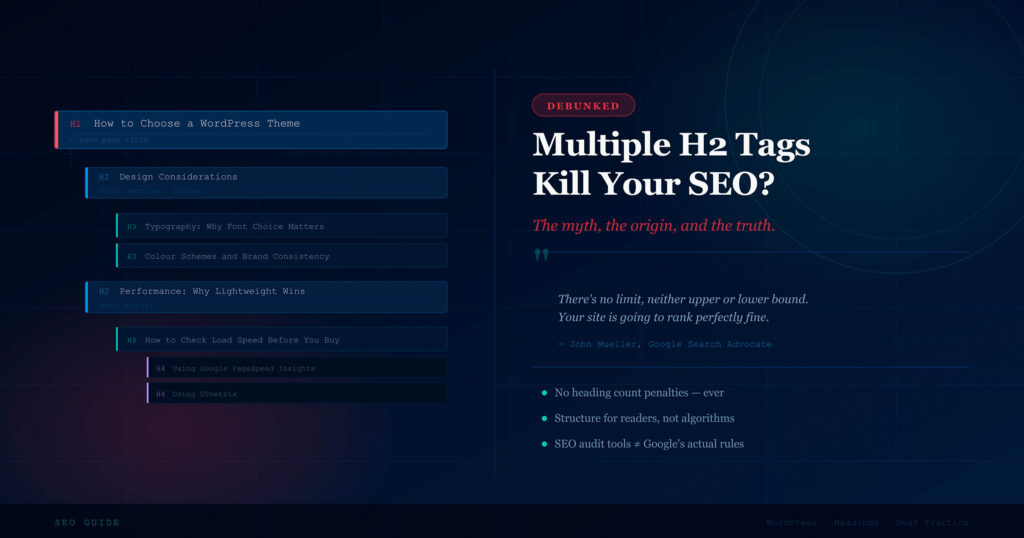
Good structure (content-led):
H1: How to Choose a WordPress Theme
- H2: Start With Your Goals: What Does Your Site Need to Do?
- H2: Design Considerations: Layouts, Fonts, and Visual Style
- H3: Choosing a Layout That Fits Your Content
- H3: Typography: Why Font Choice Matters More Than You Think
- H3: Colour Schemes and Brand Consistency
- H2: Performance Matters: Why a Lightweight Theme Wins Long-Term
- H3: What “Lightweight” Actually Means in Practice
- H3: How to Check a Theme’s Load Speed Before You Buy
- H4: Using Google PageSpeed Insights
- H4: Using GTmetrix
- H2: Free vs. Premium: What the Price Difference Actually Gets You
- H2: Must-Have Features to Check Before You Commit
- H3: WooCommerce Compatibility
- H3: Mobile Responsiveness
- H3: Plugin Support and Known Conflicts
- H2: How to Test a Theme Before Going Live
- H2: Common Mistakes to Avoid When Choosing a Theme
Notice how the hierarchy works: each H2 is a major chapter, H3s break that chapter into distinct sub-topics, and H4s drill down further where a sub-topic genuinely needs it — in this case, listing specific tools within a “how to” step. Not every H2 needs H3s, and not every H3 needs H4s. The hierarchy should only go deeper when the content actually calls for it, not to fill out a structure for its own sake.
A useful rule of thumb for any level: if the heading could be replaced with “More Information” and the reader wouldn’t notice the difference, it’s too vague. If removing it would leave a meaningful section of content without a proper signpost, it needs to stay.
Headings, Accessibility, and Why Google Cares
There’s a dimension to heading structure that often goes unmentioned in SEO discussions: accessibility.
Screen readers — the software used by visually impaired users to navigate websites — rely heavily on heading tags to help users jump between sections of a page. A logical, well-structured heading hierarchy isn’t just useful for sighted users skimming an article; it’s often the primary way that assistive technology users navigate content at all. A page with no headings, or with headings used purely for visual styling, is significantly harder to use for anyone relying on a screen reader.
This matters for SEO because Google has been explicit about the relationship between accessibility and quality. Pages that serve a wider range of users — including those with disabilities — are better pages by definition. Google’s broader focus on page experience reflects a commitment to rewarding sites that prioritise all users, not just the majority.
In other words, structuring your headings clearly and logically isn’t just good SEO practice and good writing practice — it’s also good ethics. The benefits reinforce each other.
What Actually Matters With H2 Tags
Rather than asking “how many H2s should I use?”, the better questions are:
Does each H2 accurately describe the section that follows it? Vague or misleading headings don’t help Google or your readers. Specific, descriptive headings do both.
Do your H2s follow a logical progression? Your headings should tell a story when read in sequence. A reader skimming your post by headings alone should come away with a solid grasp of what the article covers.
Are you using H2s for structure, not decoration? Heading tags are not design elements. If you’re using an H2 purely because you like the font size, consider using styled paragraph text instead. As Mueller noted in a 2023 Twitter/X response, using headings semantically — so they convey what a section is actually about — is what’s useful to Google.
Are you keyword stuffing your headings? This is the one heading-related habit that could genuinely work against you. Cramming your target keyword into every H2 looks unnatural, reads poorly, and is the kind of manipulation Google’s systems are specifically designed to detect and discount.
Frequently Asked Questions About H2 Tags and SEO
Even after reading the above, a few specific questions tend to come up. Here are the most common ones, answered directly.
Will Google penalise me for having 15 H2 tags?
No. There is no penalty for any specific number of heading tags. If your content legitimately requires 15 H2s, use them.
Should my H2s always contain my target keyword?
Not necessarily. Your headings should describe the section accurately. If your target keyword fits naturally, include it. If forcing it in makes the heading awkward or less useful to the reader, leave it out.
What if my SEO plugin flags multiple H2s as an error?
Who do you think know best? Trust Google's John Mueller over your plugin when he says it does not matter. Automated tools run rule-based checks; they do not reflect Google's actual ranking signals. Flag it as a false positive and move on.
Do H2 tags help with featured snippets?
Yes. Google frequently pulls content from well-structured sections to populate featured snippets and "People Also Ask" results. A clear H2 that matches a common question — followed by a direct, well-written answer — is one of the most reliable ways to earn these placements.
Does it matter if my H2s aren't in order? For example, jumping from H2 to H4?
Skipping heading levels is technically valid HTML and Google won't penalise you for it. However, it's worth avoiding where possible, because it can confuse both readers and screen readers. A consistent hierarchy is simply cleaner.
The WordPress-Specific Reality
For WordPress website owners in particular, the heading myth causes two distinct problems.
The first is unnecessary anxiety. Bloggers and site owners spend time auditing their post structures, rewriting perfectly good headings, and second-guessing content decisions — all to satisfy a rule that doesn’t exist.
The second is worse: content that’s been artificially constrained. When you limit yourself to three H2s on a comprehensive guide, you often end up either cramming too much into each section (making content harder to read) or leaving out detail that would genuinely serve your audience. Both outcomes hurt the reader experience, and reader experience is what Google’s modern algorithm is built to reward.
Write your content first. Structure it in a way that makes sense for your readers. Use as many H2s as the content naturally calls for. Then check that your headings are descriptive, sequential, and genuinely useful. That’s the complete checklist — no arbitrary number required.
The Bottom Line
The “multiple H2 tags hurt SEO” rule has no basis in how Google’s systems actually work. It’s a relic of early-2000s SEO thinking that has persisted through repetition and the false authority of automated audit tools.
Google’s own John Mueller has explicitly confirmed — multiple times, in multiple formats — that heading tag counts are not a ranking factor. What matters is whether your headings help users understand and navigate your content. Use as many H2s as your content needs, make them descriptive, keep them honest, and let Google do the rest.
Your headings are a roadmap. Build the roadmap your readers actually need.
Need help structuring your WordPress content for both readers and search engines? Get in touch — we build WordPress websites designed to perform.